
Migrating to Our New High-Performance Calculator
We’ve launched a major update to our calculator with significant performance improvements. This guide will help you migrate from the old endpoint to our new, faster calculator.
Why Migrate?
Section titled “Why Migrate?”Our new calculator delivers:
- 90% faster load times in most locations
- Reduced file size from 1.2MB to just 0.2MB
- Global CDN delivery through Cloudflare for faster worldwide access
- Optimised code with improved dependencies and compression
Migration Steps
Section titled “Migration Steps”The migration process is simple and only takes a few minutes:
Step 1: Access Your Dashboard
Section titled “Step 1: Access Your Dashboard”Log into your Calcumate dashboard
Step 2: Update Your Calculator
Section titled “Step 2: Update Your Calculator”- Navigate to your calculator settings
- Click Edit on your existing calculator
- Click Publish to regenerate your integration code
Step 3: Update Your Website Code
Section titled “Step 3: Update Your Website Code”After republishing, you’ll receive new integration code. The key change is:
New endpoint:
<script defer src="https://production.calcumate.co/static/js/main.js"></script>Copy the new code and replace it on your website where the calculator is displayed.
Performance Comparison
Section titled “Performance Comparison”Based on testing from various US locations, here’s what you can expect:
Before Migration (Old Calculator)
Section titled “Before Migration (Old Calculator)”- Total Load Time: 997.4ms
- File Transfer: ~1.2MB
- Connection Time: 281.9ms
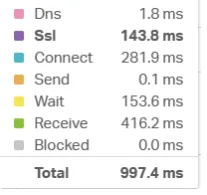
After Migration (New Calculator)
Section titled “After Migration (New Calculator)”- Total Load Time: 98.2ms (90% improvement)
- File Transfer: ~0.2MB (83% reduction)
- Connection Time: 28.2ms (90% improvement)
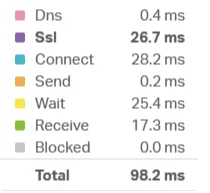
Results may vary based on your internet connection and geographic location.
Need Help?
Section titled “Need Help?”If you encounter any issues during migration or have questions about the process, please contact our support team. We’re here to ensure a smooth transition to the new calculator.
Important Notes
Section titled “Important Notes”- The migration only affects the technical endpoint - your calculator settings, design, and functionality remain unchanged.
- Users will experience faster loading times immediately after migration.
- No downtime is required for this migration process.