
Filtering to available units
This guide provides instructions on how to filter out unavailable units from being displayed in the list of suggested units.
Overview
Section titled “Overview”Calcumate allows you to filter out specific units so that they do not appear in the results. This can be useful for managing inventory and ensuring only available units are displayed to users.
Instructions
Section titled “Instructions”Disabling Units
Section titled “Disabling Units”To disable specific units, use the following JavaScript code:
window.dispatchEvent(new CustomEvent("calcumateLoad", { detail: [<Units ID>, <Units ID>],}));- Replace
<Units ID>with the actual IDs of the units you want to disable. - You can list multiple unit IDs separated by commas within the square brackets.
Enabling All Units
Section titled “Enabling All Units”To enable all units again, pass an empty array in the detail:
window.dispatchEvent(new CustomEvent("calcumateLoad", { detail: [],}));Listing Available Units
Section titled “Listing Available Units”To see a list of all available units, use the following command:
window.listUnits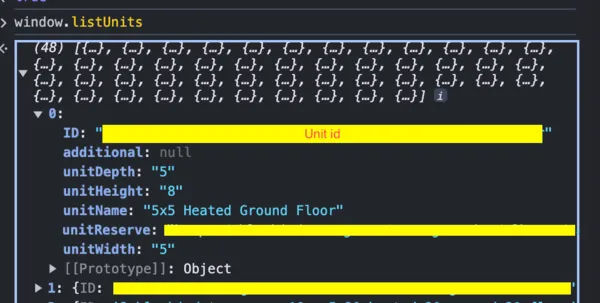
Listing Disabled Units
Section titled “Listing Disabled Units”To see a list of all currently disabled units, use the following command:
window.disableUnitsExample
Section titled “Example”- Here is an example of how to disable two units with IDs
123and456:
window.dispatchEvent(new CustomEvent("calcumateLoad", { detail: [123, 456],}));To enable all units again:
window.dispatchEvent(new CustomEvent("calcumateLoad", { detail: [],}));